OrganizationProfileView
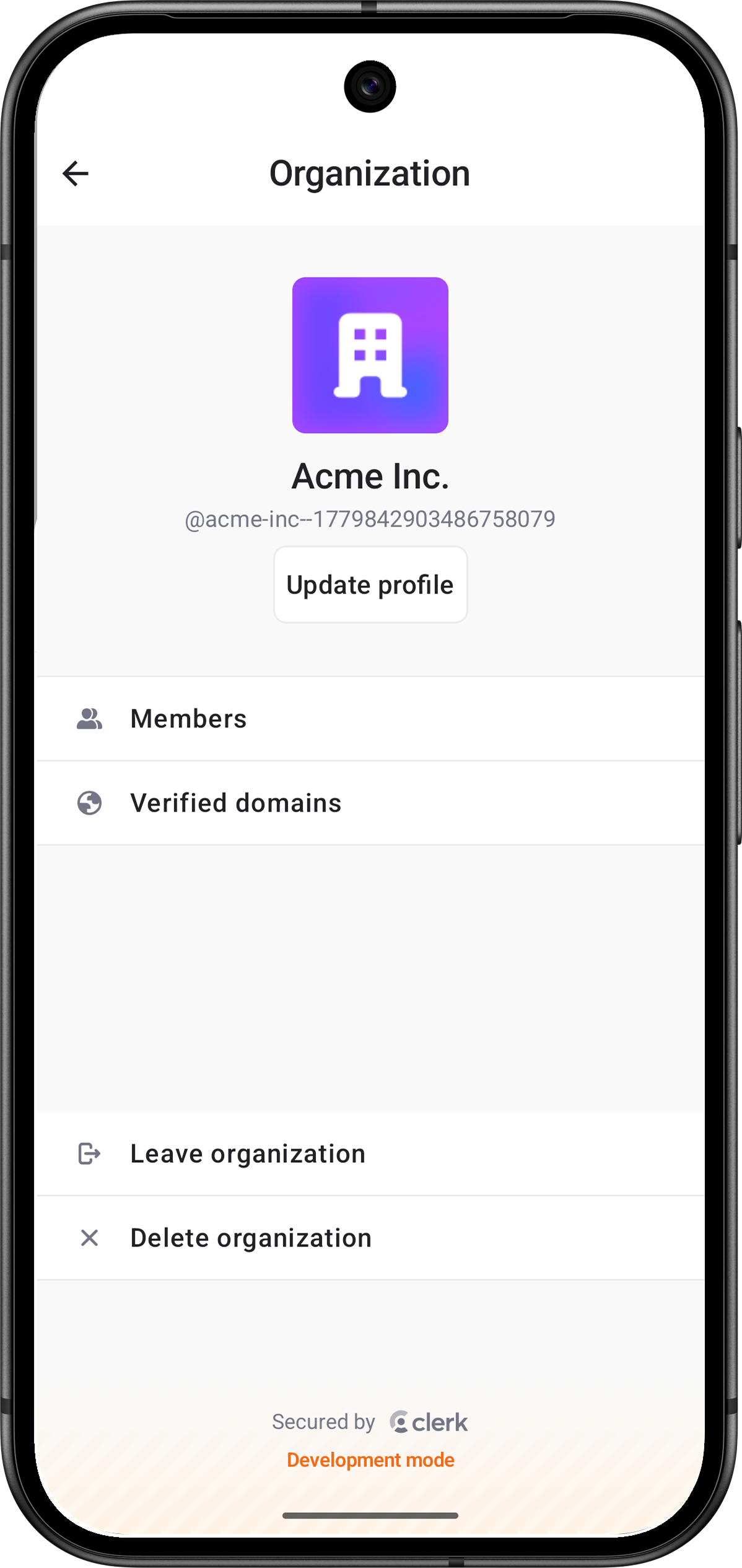
The OrganizationProfileView renders the management interface. It includes permission-gated Organization profile editing, member management, invitations, Membership Requests, Verified Domains, and flows for leaving or deleting the Organization.
OrganizationProfileView renders content only when a session has an . Rows and actions are shown according to the current user's Organization membership Permissions and the current environment settings.
Parameters
- Name
clerkTheme- Type
ClerkTheme?- Description
The theme to apply to the
OrganizationProfileView.
- Name
customDestination- Type
(@Composable (String) -> Unit)?- Description
Destination builder for custom rows. The destination receives the tapped row's
routeKey. Custom rows are ignored when this isnull.
- Name
customRows- Type
List<OrganizationProfileCustomRow>- Description
Custom rows to display on the profile root screen.
- Name
isDismissible- Type
Boolean- Description
Whether the view can be dismissed by the user. When
true, a dismiss button appears in the navigation bar. Whenfalse, no dismiss button is shown. Defaults totrue.
- Name
modifier- Type
Modifier- Description
A modifier that gets applied to
OrganizationProfileView.
- Name
onDismiss- Type
() -> Unit- Description
Called when the view is dismissed or when no is available.
Visible rows and Permissions
The profile view shows Organization controls based on the active membership's Permissions and instance settings:
- Update profile appears when the user has
canManageProfile. - Members appears when the user has
canReadMembershipsorcanManageMemberships. - Verified domains appears when Organization domains are enabled and the user has
canReadDomainsorcanManageDomains. - Leave Organization appears when there is an membership.
- Delete Organization appears when dashboard admin delete is enabled,
organization.adminDeleteEnabledistrue, and the user hascanDeleteOrganization.
Use OrganizationProfileCustomRow to insert custom rows relative to built-in rows or sections.
Related types:
OrganizationProfileCustomRowOrganizationProfileRowIconOrganizationProfileCustomRowPlacementOrganizationProfileRowOrganizationProfileSection
Usage
The following examples show how to use the OrganizationProfileView in your app.
Fullscreen Organization profile
import androidx.compose.foundation.layout.fillMaxSize
import androidx.compose.runtime.Composable
import androidx.compose.ui.Modifier
import com.clerk.ui.organizationprofile.OrganizationProfileView

@Composable
fun OrganizationSettingsScreen(onDone: () -> Unit) {
    OrganizationProfileView(
        modifier = Modifier.fillMaxSize(),
        isDismissible = true,
        onDismiss = onDone,
    )
}import androidx.compose.material.icons.Icons
import androidx.compose.material.icons.filled.Settings
import com.clerk.ui.organizationprofile.OrganizationProfileView
import com.clerk.ui.organizationprofile.custom.OrganizationProfileCustomRow
import com.clerk.ui.organizationprofile.custom.OrganizationProfileCustomRowPlacement
import com.clerk.ui.organizationprofile.custom.OrganizationProfileRow
import com.clerk.ui.organizationprofile.custom.OrganizationProfileRowIcon
import com.clerk.ui.organizationprofile.custom.OrganizationProfileSection
val rows = listOf(
OrganizationProfileCustomRow(
routeKey = "settings",
title = "Settings",
icon = OrganizationProfileRowIcon.Vector(Icons.Filled.Settings),
placement = OrganizationProfileCustomRowPlacement.After(OrganizationProfileRow.Members),
),
OrganizationProfileCustomRow(
routeKey = "support",
title = "Support",
icon = OrganizationProfileRowIcon.Vector(Icons.Filled.Settings),
placement = OrganizationProfileCustomRowPlacement.SectionEnd(OrganizationProfileSection.Actions),
),
)
OrganizationProfileView(
customRows = rows,
customDestination = { routeKey ->
when (routeKey) {
// Replace this placeholder with the custom view for your Settings row.
"settings" -> OrganizationSettingsContent()
// Replace this placeholder with the custom view for your Support row.
"support" -> OrganizationSupportContent()
}
},
)Feedback
Last updated on