OrganizationSwitcher
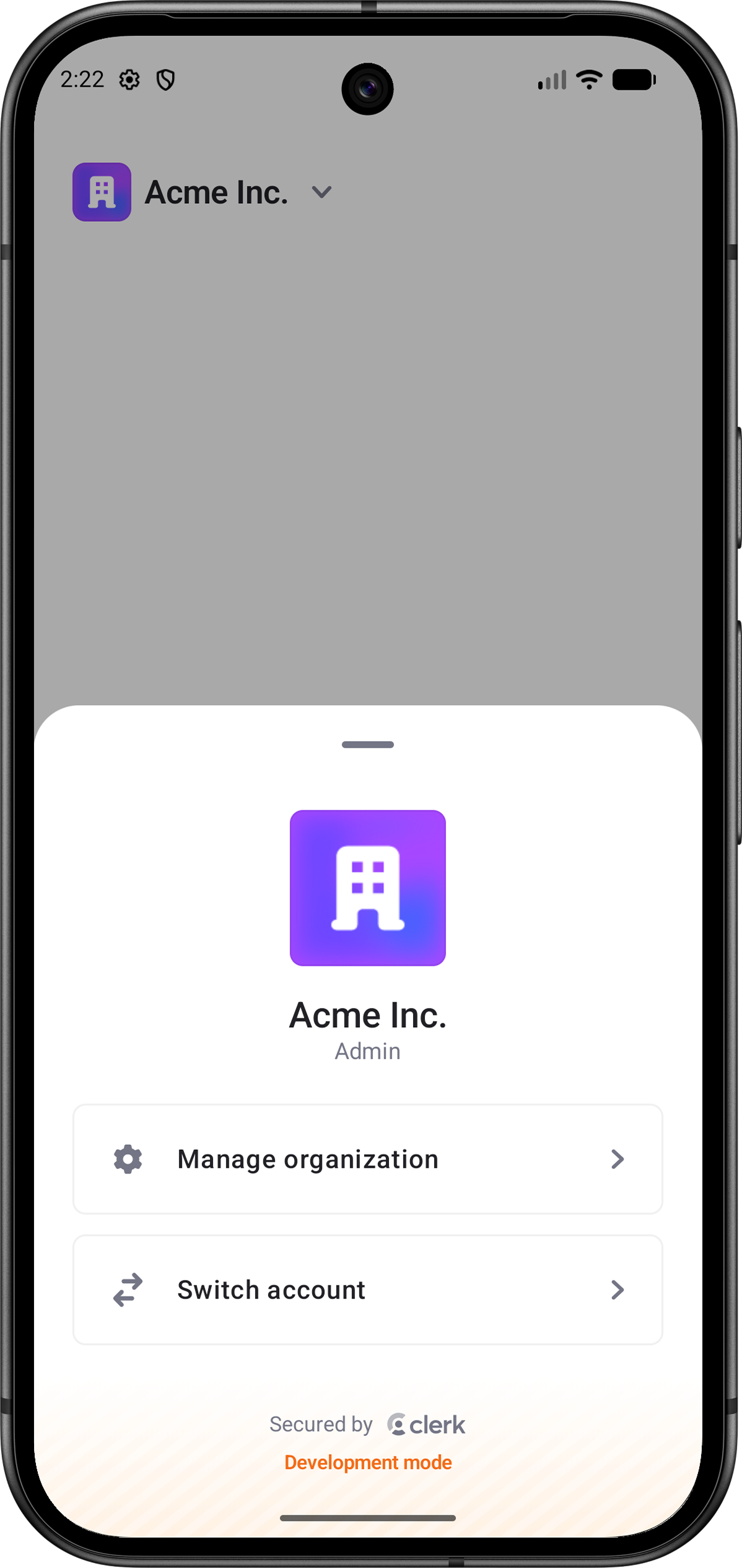
The OrganizationSwitcher renders an account switcher interface that lets signed-in users switch between their Personal and Organization accounts. It displays the , or the user's when no Organization is selected, and provides built-in native controls for managing the Active Organization, switching accounts, accepting Organization invitations and suggestions, and creating an Organization when permitted.
OrganizationSwitcher only renders when a user is signed in and Organizations are enabled for the instance. When Organization selection is required, the Personal Account option is hidden automatically.
OrganizationSwitcher renders the Organization or account trigger only. Render UserButton separately when your layout also needs a profile control.
- Name
clerkTheme- Type
ClerkTheme?- Description
The theme to apply to the
OrganizationSwitcher.
- Name
displayMode- Type
OrganizationSwitcherDisplayMode- Description
Controls the trigger style. Defaults to
OrganizationSwitcherDisplayMode.Normal.The supported values are:
OrganizationSwitcherDisplayMode.NormalOrganizationSwitcherDisplayMode.CompactOrganizationSwitcherDisplayMode.normal(size)OrganizationSwitcherDisplayMode.compact(size)
Normalshows the active account avatar, account name, and disclosure chevron.Compactshows only the avatar-sized account trigger. The default base avatar size is36.dp.
- Name
hidePersonal- Type
Boolean- Description
Whether the option should be hidden even when the option is allowed. Defaults to
false.
- Name
modifier- Type
Modifier- Description
A modifier that gets applied to
OrganizationSwitcher.
- Name
onCreateOrganization- Type
((OrganizationCreationDefaults?) -> Unit)?- Description
Called when the user selects the Create organization action. When
null, the switcher opens the default Organization creation flow.
- Name
onManageOrganization- Type
((OrganizationMembership) -> Unit)?- Description
Called when the user selects the Manage organization action. When
null, the switcher opens the default OrganizationProfileView.
- Name
onOrganizationChanged- Type
(() -> Unit)?- Description
Called after the user successfully switches to an Organization or .
- Name
organizationProfileCustomDestination- Type
(@Composable (String) -> Unit)?- Description
Custom destination builder forwarded to the default OrganizationProfileView. The destination receives the tapped row's
routeKey.
- Name
organizationProfileCustomRows- Type
List<OrganizationProfileCustomRow>- Description
Custom rows forwarded to the default OrganizationProfileView opened by the switcher.
import androidx.compose.foundation.layout.Column
import androidx.compose.foundation.layout.fillMaxSize
import androidx.compose.foundation.layout.padding
import androidx.compose.foundation.layout.statusBarsPadding
import androidx.compose.runtime.Composable
import androidx.compose.runtime.getValue
import androidx.compose.ui.Modifier
import androidx.compose.ui.unit.dp
import androidx.lifecycle.compose.collectAsStateWithLifecycle
import com.clerk.api.Clerk
import com.clerk.api.session.pendingTaskKey
import com.clerk.ui.auth.AuthView
import com.clerk.ui.organizationswitcher.OrganizationSwitcher

@Composable
fun HomeScreen() {
    val session by Clerk.sessionFlow.collectAsStateWithLifecycle()
    val user by Clerk.userFlow.collectAsStateWithLifecycle()

    if (user != null && session?.pendingTaskKey == null) {
        Column(
            modifier = Modifier
                .fillMaxSize()
                .statusBarsPadding()
                .padding(24.dp),
        ) {
            OrganizationSwitcher()
        }
    } else {
        AuthView()
    }
}import androidx.compose.ui.unit.dp
import com.clerk.ui.organizationswitcher.OrganizationSwitcher
import com.clerk.ui.organizationswitcher.OrganizationSwitcherDisplayMode
OrganizationSwitcher(
displayMode = OrganizationSwitcherDisplayMode.compact(size = 40.dp),
)OrganizationSwitcher(
onOrganizationChanged = {
// Refresh Organization-scoped data.
},
onManageOrganization = { membership ->
// Navigate to your own Organization settings screen.
},
onCreateOrganization = { creationDefaults ->
// Navigate to your own Organization creation flow.
},
)Custom rows are shown in the switcher's default OrganizationProfileView only when you provide both organizationProfileCustomRows and organizationProfileCustomDestination.
import androidx.compose.material.icons.Icons
import androidx.compose.material.icons.filled.Settings
import com.clerk.ui.organizationprofile.custom.OrganizationProfileCustomRow
import com.clerk.ui.organizationprofile.custom.OrganizationProfileCustomRowPlacement
import com.clerk.ui.organizationprofile.custom.OrganizationProfileRow
import com.clerk.ui.organizationprofile.custom.OrganizationProfileRowIcon
import com.clerk.ui.organizationswitcher.OrganizationSwitcher

OrganizationSwitcher(
    organizationProfileCustomRows = listOf(
        OrganizationProfileCustomRow(
            routeKey = "settings",
            title = "Settings",
            icon = OrganizationProfileRowIcon.Vector(Icons.Filled.Settings),
            placement = OrganizationProfileCustomRowPlacement.After(OrganizationProfileRow.Members),
        )
    ),
    organizationProfileCustomDestination = { routeKey ->
        when (routeKey) {
            // Replace this placeholder with the custom view for your Settings row.
            "settings" -> OrganizationSettingsContent()
        }
    },
)
Feedback
Last updated on