AuthView
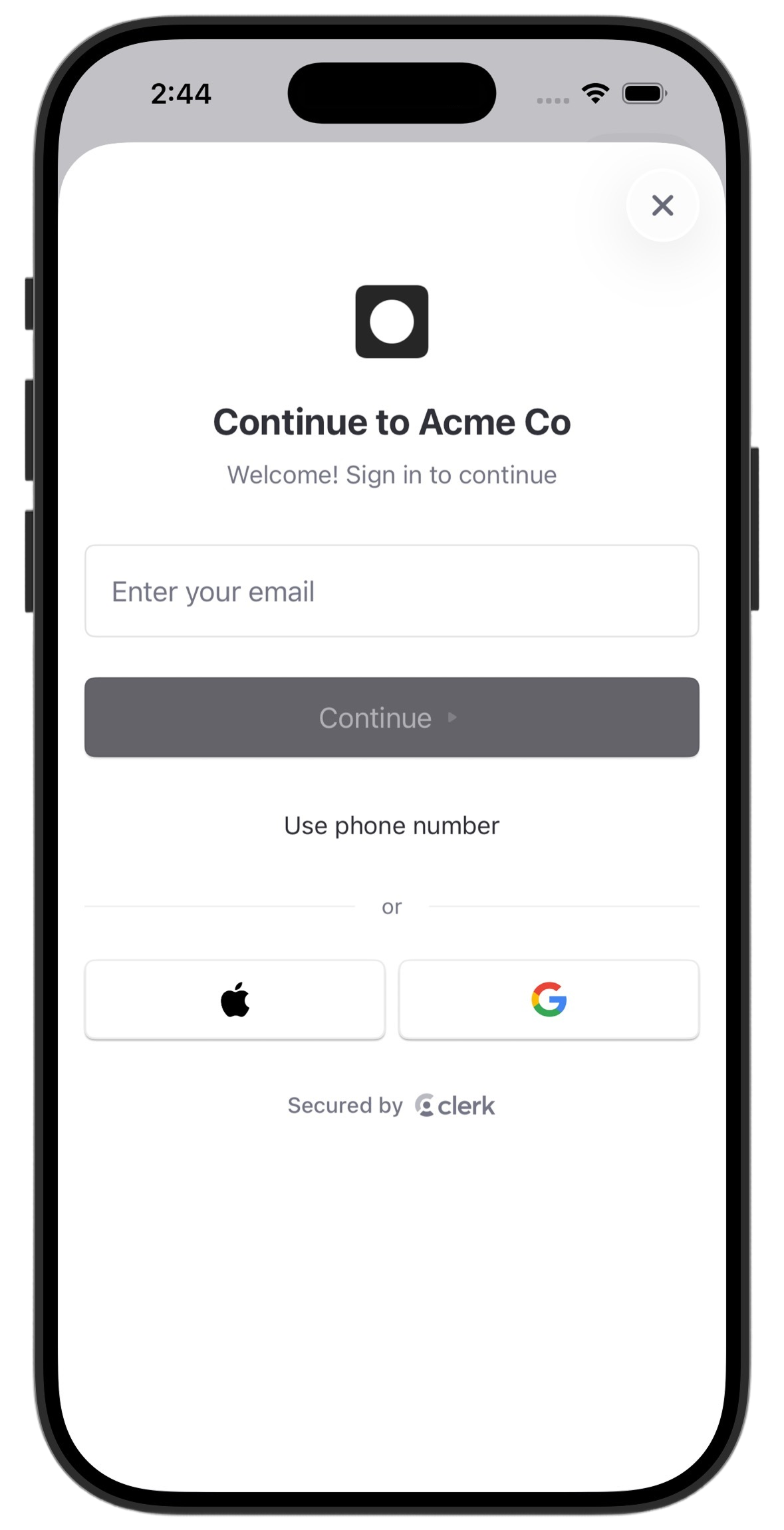
The AuthView renders a comprehensive authentication interface with support for multiple sign-up flows and sign-in methods, multi-factor authentication, password reset, and account recovery. The functionality of the AuthView is controlled by the instance settings you specify in the Clerk Dashboard, such as sign-in and sign-up options and social connections.
By default, the AuthView will automatically determine whether to sign users in or sign them up based on whether they already have an account. This is the default mode that provides seamless authentication without requiring users to choose between sign-in and sign-up.
Parameters
- Name
isDismissible- Type
Bool- Description
Whether the view can be dismissed by the user. When
true, a dismiss button appears and the view closes automatically after successful authentication. Whenfalse, no dismiss button is shown. Defaults totrue.
- Name
mode- Type
AuthView.Mode- Description
The authentication mode that determines which flows are available to the user. Accepts the following values:
.signInOrUp: Automatically determines whether to sign users in or sign them up based on whether they already have an account. This is the default mode that provides seamless authentication without requiring users to choose between sign-in and sign-up..signIn: Restricts the interface to sign-in flows only. Users can only authenticate with existing accounts..signUp: Restricts the interface to sign-up flows only. Users can only create new accounts.
Defaults to
.signInOrUp.
- Name
onAuthComplete- Type
@MainActor () -> Void- Description
Called once when the auth flow completes successfully and all Clerk-managed post-authentication steps finish. The current session is active when the callback runs. For a dismissible
AuthView, it runs immediately before the view dismisses itself. It doesn't run if the user dismisses the view before the auth flow completes.
Modifiers
Apply the following modifiers directly to an AuthView. To change the logo it shows, see Custom app logo.
- Name
initialFirstName(_:)- Type
String- Description
Prefills the first name field during sign-up.
- Name
initialIdentifier(_:)- Type
String- Description
Prefills the identifier field on the start screen. The view detects phone numbers and routes them to the phone number field. Include the country code with a leading
+; otherwise, the view might not detect it as a phone number.
- Name
initialLastName(_:)- Type
String- Description
Prefills the last name field during sign-up.
- Name
lockPrefilledFields(_:)- Type
Bool- Description
Whether non-empty values set with
initialIdentifier(_:),initialFirstName(_:), orinitialLastName(_:)show as read-only fields. Fields without a prefilled value stay editable.lockPrefilledFields()with no argument locks them. Without this modifier, prefilled fields are editable.
- Name
persistsIdentifiers(_:)- Type
Bool- Description
Whether the view stores identifiers the user enters and restores them between sessions.
falsealso clears any stored identifiers. Defaults totrue.
- Name
unsafeMetadata(_:)- Type
JSON?- Description
Unsafe metadata to attach to users this
AuthViewcreates.AuthViewsends it only when the flow creates a sign-up, including a sign-in that transfers to sign-up.
The following examples show how to use the AuthView in your iOS app.
Basic usage as a dismissible sheet
import SwiftUI
import ClerkKit
import ClerkKitUI

struct HomeView: View {
  @Environment(Clerk.self) private var clerk
  @State private var authIsPresented = false

  var body: some View {
    VStack {
      UserButton(signedOutContent: {
        Button("Sign in") {
          authIsPresented = true
        }
      })
    }
    .prefetchClerkImages()
    .sheet(isPresented: $authIsPresented) {
      AuthView()
    }
  }
}
Fullscreen authentication (non-dismissible)
When a non-dismissible AuthView is your app's root authentication view, check clerk.isAuthFlowComplete instead of clerk.user before replacing the AuthView with authenticated content. Clerk sets clerk.user as soon as the user authenticates, while isAuthFlowComplete stays false until the session is active and the AuthView finishes its post-authentication steps, such as session tasks or biometric enrollment.
import SwiftUI
import ClerkKit
import ClerkKitUI

struct ProfileView: View {
  @Environment(Clerk.self) private var clerk

  var body: some View {
    if clerk.isAuthFlowComplete {
      UserProfileView(isDismissible: false)
    } else {
      AuthView(isDismissible: false)
    }
  }
}
Prefill fields and handle completion
The following example prefills the user's email address and name, locks the prefilled fields, attaches unsafe metadata to new users, and runs code when authentication completes.
import SwiftUI
import ClerkKit
import ClerkKitUI

struct PrefilledSignUpView: View {
  @State private var authIsPresented = false

  var body: some View {
    Button("Sign up") {
      authIsPresented = true
    }
    .sheet(isPresented: $authIsPresented) {
      AuthView(mode: .signUp) {
        print("Authentication complete")
      }
      .initialIdentifier("jane@example.com")
      .initialFirstName("Jane")
      .initialLastName("Doe")
      .lockPrefilledFields()
      .unsafeMetadata(["referralSource": "newsletter"])
    }
  }
}
Customization
To learn how to customize Clerk views, see the dedicated guide.
If Clerk's prebuilt views don't meet your specific needs or if you require more control over the logic, you can rebuild the existing Clerk flows using the Clerk API. For more information, see the custom flow guides.
Feedback
Last updated on